
Share this
by Keith Gutierrez on Jun 19, 2026
Most marketing leaders authorize a CRM migration hoping to finally connect campaign spend to closed-won revenue.
They usually end up with a cloud-based spreadsheet that still relies on sales reps manually updating deal stages at the end of the quarter.
That manual setup is exactly why attribution remains broken and revenue goals get missed due to leaky handoffs.
This guide covers how to dismantle organizational data silos and build a closed-loop system during your RevOps for spreadsheet to CRM migration.
Why Most Initial Migrations Fail to Deliver Revenue Intelligence
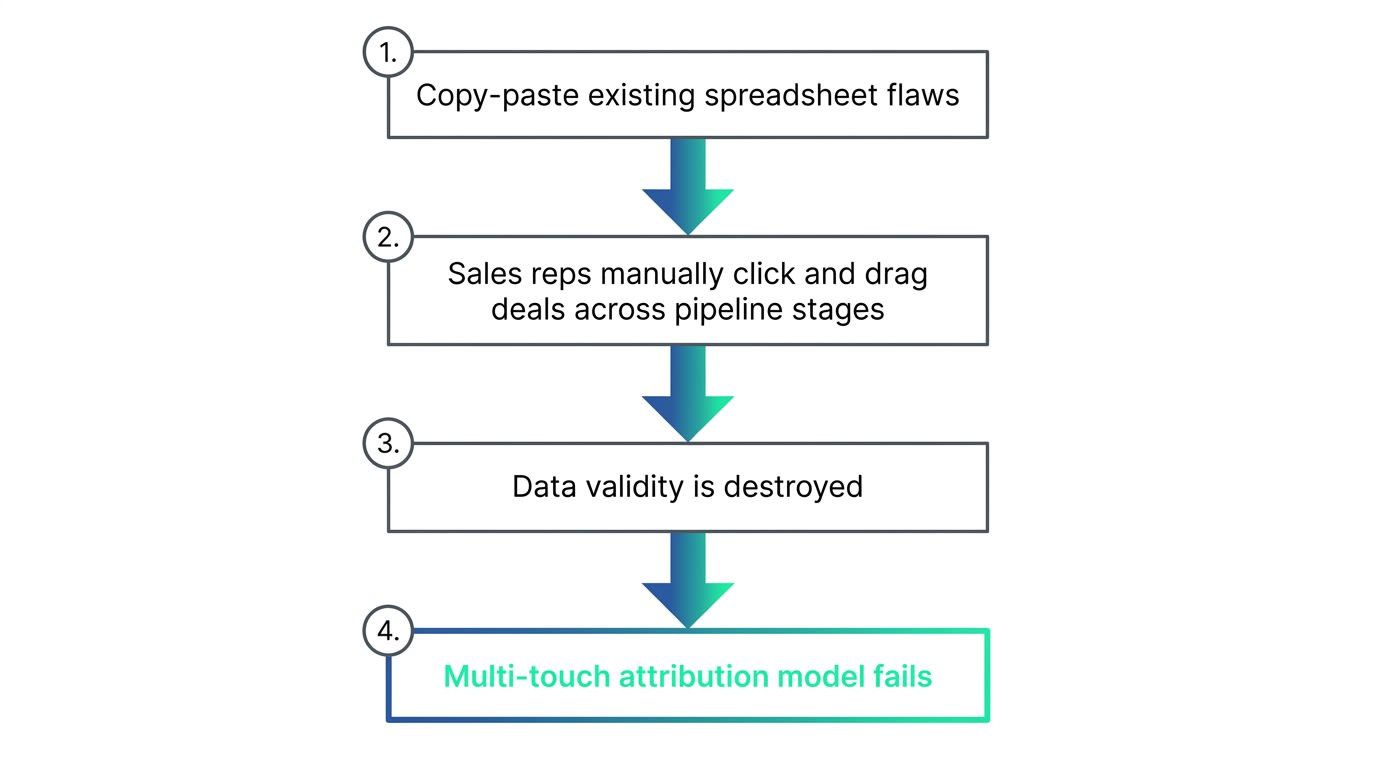
In our own implementation work, we frequently replace systems where the initial migration simply copy-pasted existing flaws.
When moving off spreadsheets, companies default to letting sales reps manually click and drag deals across pipeline stages.
This manual movement destroys data validity instantly.
Here's the thing:
If a sales rep can move a contact from Lead to Closed without any system checks, your executive dashboards are fiction.
You cannot run a multi-touch revenue attribution model on data that changes based on human memory.
The data must be governed upstream before it ever reaches a CRO or VP of Marketing.
Enforcing the Automated 5-Stage Funnel Model
When the webhook broke during a client's Q3 campaign, three weeks of attribution data were almost lost permanently.
That vulnerability forces a complete rethink of how data enters the CRM.
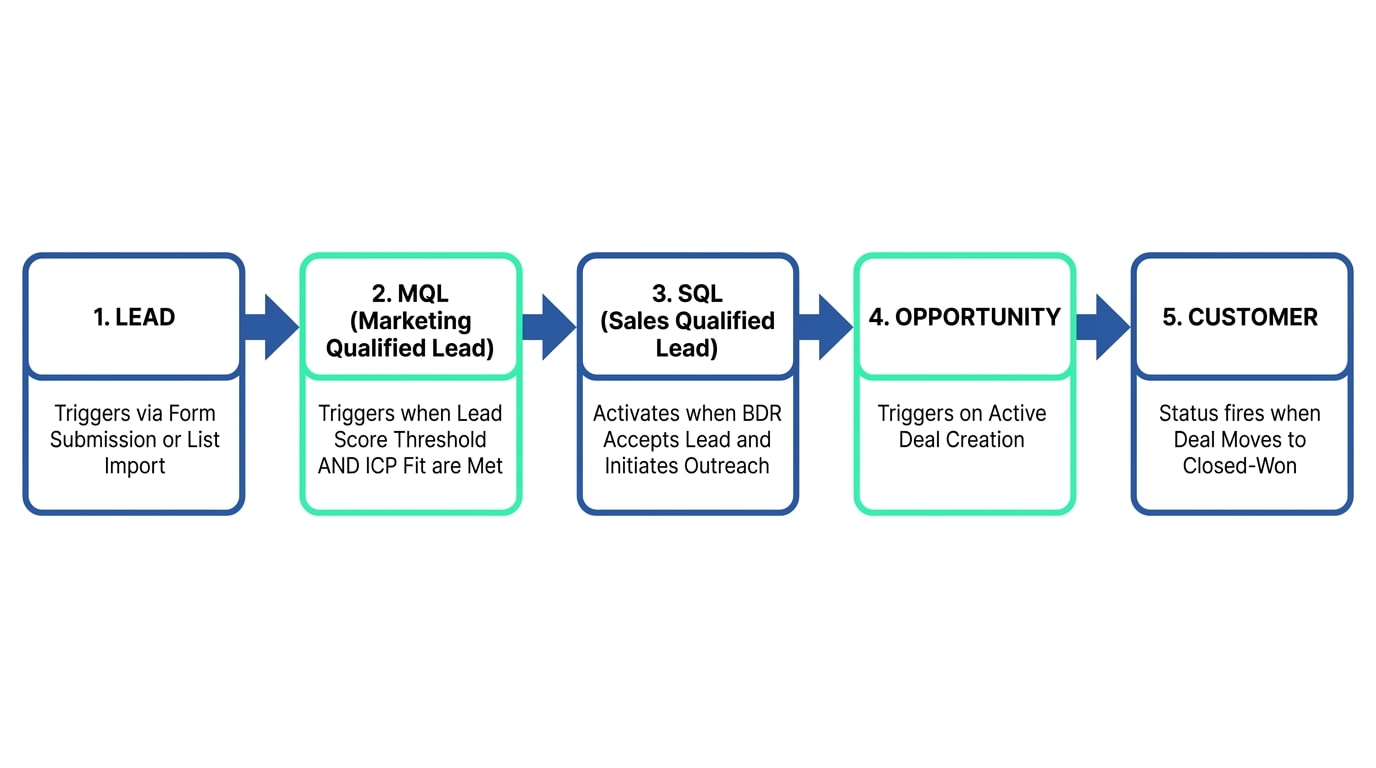
We replace legacy passive lifecycle definitions with a strict, automated 5-Stage Funnel Model.
This framework relies on clear technical entry and exit rules.
First, the Lead stage triggers automatically via form submission or list import.
Event badge scans bypass standard gates and advance directly to the next tier.
But here's where it gets interesting:
The MQL stage is never a subjective decision.
It triggers automatically when a contact crosses a designated lead score threshold AND meets ICP fit rules.
Those fit rules require a target organization type and priority role, plus at least one meaningful engagement like a webinar or content download.
The SQL stage activates when a BDR accepts the lead and initiates outreach.
This is managed through explicit Lead Status tracking: New, Attempting, or Connected.
From there, the Opportunity stage triggers automatically when an active Deal is created, and Customer status fires when that Deal moves to Closed-Won.
Aligning Sales and Marketing Definitions Before You Migrate
Before you map a single column during a RevOps for spreadsheet to CRM migration, you have to define what a lead actually is.
In a spreadsheet culture, marketing decides a lead is anyone who downloads an ebook.
Sales decides a lead is only someone who actively requests a demo.
This misalignment causes BDRs to ignore marketing lists entirely.
In our implementation process, we force both teams into a room to establish the Automated 5-Stage Funnel Model.
We do not let them leave until both sides agree on the technical triggers for an MQL.
If marketing wants a lead score to trigger the MQL status, sales must agree on what score threshold indicates real buying intent.
This prevents marketing from hitting their pipeline targets while sales starves for actual qualified meetings.
Architecting Pipeline for Sales Teams of 5 to 25 Reps
For sales teams of 5 to 25 representatives, we remove redundant legacy pipeline stages.
Spreadsheets encourage infinite custom columns for stalled deals.
Migrating that habit into a modern CRM creates bloated, unmanageable pipelines.
We architect modern deal flows with precise advancement criteria.
The standard pipeline includes two named stages that most implementations miss entirely.
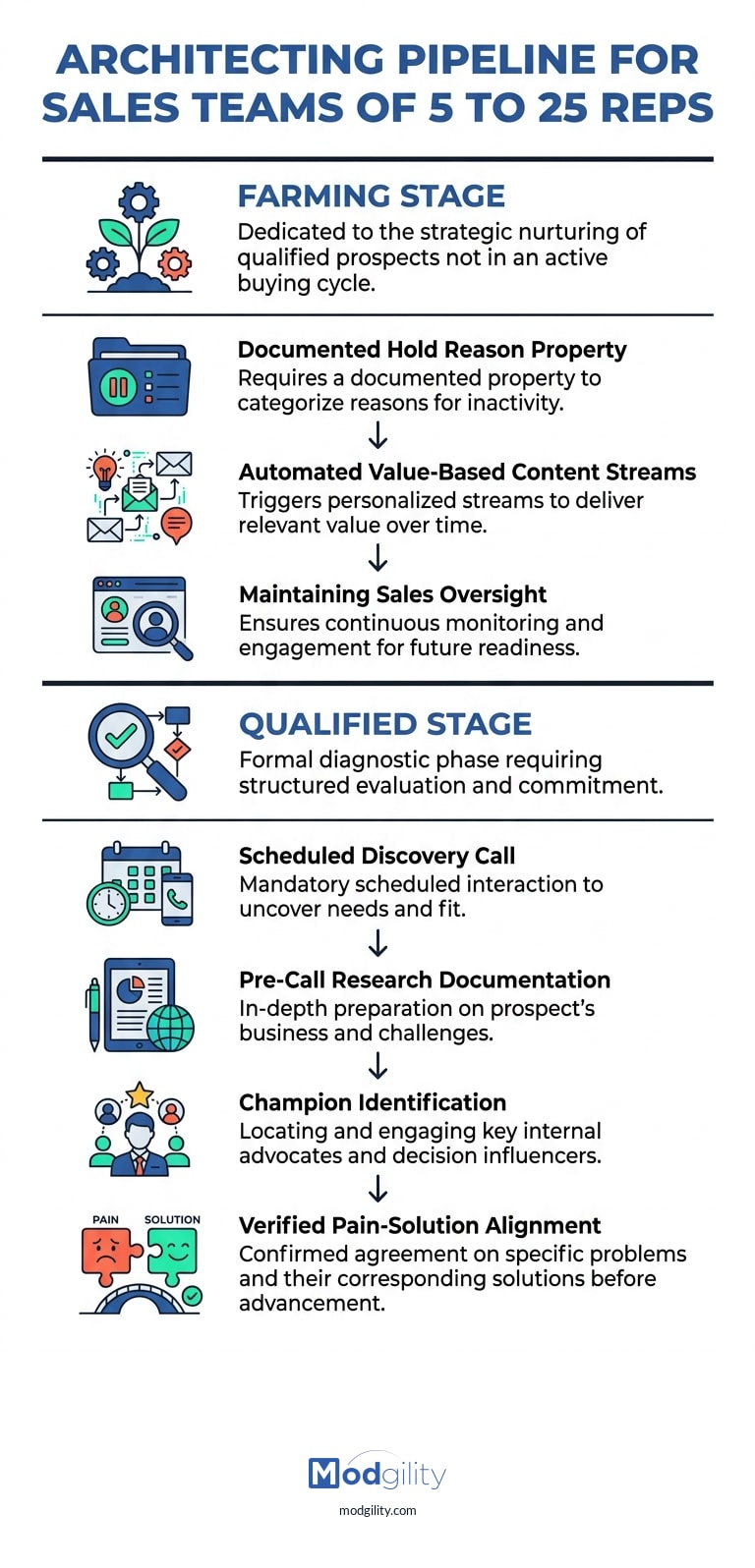
First is the Farming Stage.
This stage is dedicated to the strategic nurturing of qualified prospects not in an active buying cycle.
Usually, this delay happens due to budget freezes or leadership changes.
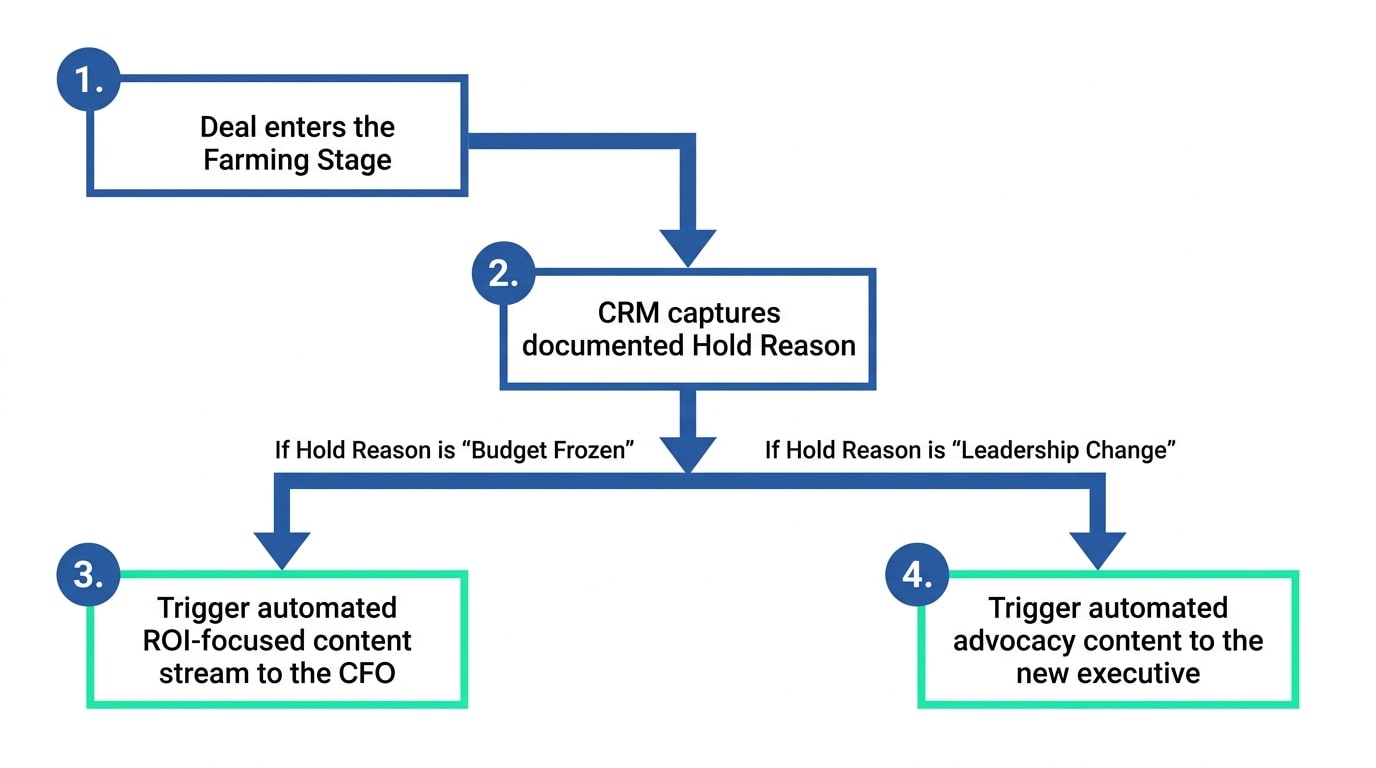
We require a documented Hold Reason property that triggers automated value-based content streams while maintaining sales oversight.
Now:
The second critical addition is the Qualified Stage.
This is a formal diagnostic phase requiring a scheduled discovery call, pre-call research documentation, and champion identification.
Advancement out of this stage requires verified Pain-Solution alignment.
The rep must document they are solving two to three core business problems, and the prospect must confirm commitment to next steps.
Every stage transition is automated.
No manual stage changes, and no rep discretion.
This produces reporting that is trustworthy at the executive level because stage data reflects actual buyer behavior, not sales rep behavior.
The Mechanics of the Farming Stage
Let us look deeper at what happens when a qualified deal stalls.
In a spreadsheet, a rep might color-code the row yellow and write a note to check back in six months.
Six months later, the rep has forgotten, and the prospect has bought from a competitor.
The Farming Stage eliminates this risk.
When a deal enters this stage, the documented Hold Reason property does more than just categorize the delay.
It triggers highly specific, automated value-based content streams tailored to that exact objection.
If the Hold Reason is "Budget Frozen," the CRM automatically routes content about proving ROI to the CFO.
If the Hold Reason is "Leadership Change," the workflow sends material on how to advocate for the platform to a new executive.
This maintains sales oversight while automating the heavy lifting of long-term nurturing.
Documenting the Qualified Stage Diagnostics
Advancing a deal to the Qualified Stage cannot be a gut feeling.
Our framework makes it a formal diagnostic phase.
A rep cannot just check a box saying the prospect seems interested.
The CRM enforces a scheduled discovery call and pre-call research documentation.
More importantly, it requires champion identification.
The rep must identify exactly who inside the organization has the political capital to push the deal forward.
Advancement requires verified Pain-Solution alignment.
This means the rep must physically type out the two to three core business problems the prospect is facing.
If those fields are blank, the deal does not advance.
This stops reps from polluting the pipeline with happy-ear forecasts that will never close.
Why Service Data Must Anchor Your RevOps Strategy
In our own implementation work, we noticed a recurring gap in how companies treat closed-won accounts.
Traditional single-hub or two-hub implementations completely ignore the post-sale loop.
They treat marketing and sales as the entire revenue engine.
The bottom line?
True Revenue Operations requires customer retention data.
This is why we embed HubSpot Service Hub as the foundational core of every RevOps engagement.
This model connects the complete customer lifecycle in a single closed loop.
We wire service metrics such as ticket resolution times and customer satisfaction scores directly back into acquisition pipelines.
We treat retention data as acquisition intelligence.
The churn signals and health metrics reveal exactly which customer segments produce the highest lifetime value.
Marketing can then adjust their targeting based on who actually stays, not just who closes.
Building Executive Dashboards You Can Defend
When a marketing leader sits down with finance, they cannot point to spreadsheet rows and hope for funding.
They need multi-touch revenue attribution frameworks that track the complete buyer path.
This path must connect the first social, SEO, or email touch straight through to the closed-won deal.
We configure these advanced frameworks in HubSpot Professional and Enterprise environments.
Executive dashboards display real-time pipeline health and marketing contribution to revenue.
They track macro-metrics including Opportunity Status (Open, Won) and Customer Status (Active, Churned).
And the best part?
Data validity is enforced by rigorous validation rules at every lifecycle stage transition gate.
You are looking at progress toward cyclical revenue goals based on hard technical checks, not feelings.
Moving from Migration to Long-Term Optimization
A completed CRM migration is just the foundation.
If you stop investing once the data is moved, the system degrades as your business processes evolve.
Post-implementation, the focus must shift to continuous content production and campaign optimization.
We offer structured Full Inbound + Advanced Revenue Analytics Advisory retainers ranging from $10,000 to $20,000 per month.
These retainers continuously optimize the HubSpot environment and measure specific revenue outcomes.
The implementation establishes the data infrastructure, and the retainer runs ongoing programs on top of it.
What does that look like in practice?
You're not likely to find someone at this price with their level of expertise. They're the machine that makes our HubSpot go. Mark Friesen, Marketing Director, Local-Government Software Company
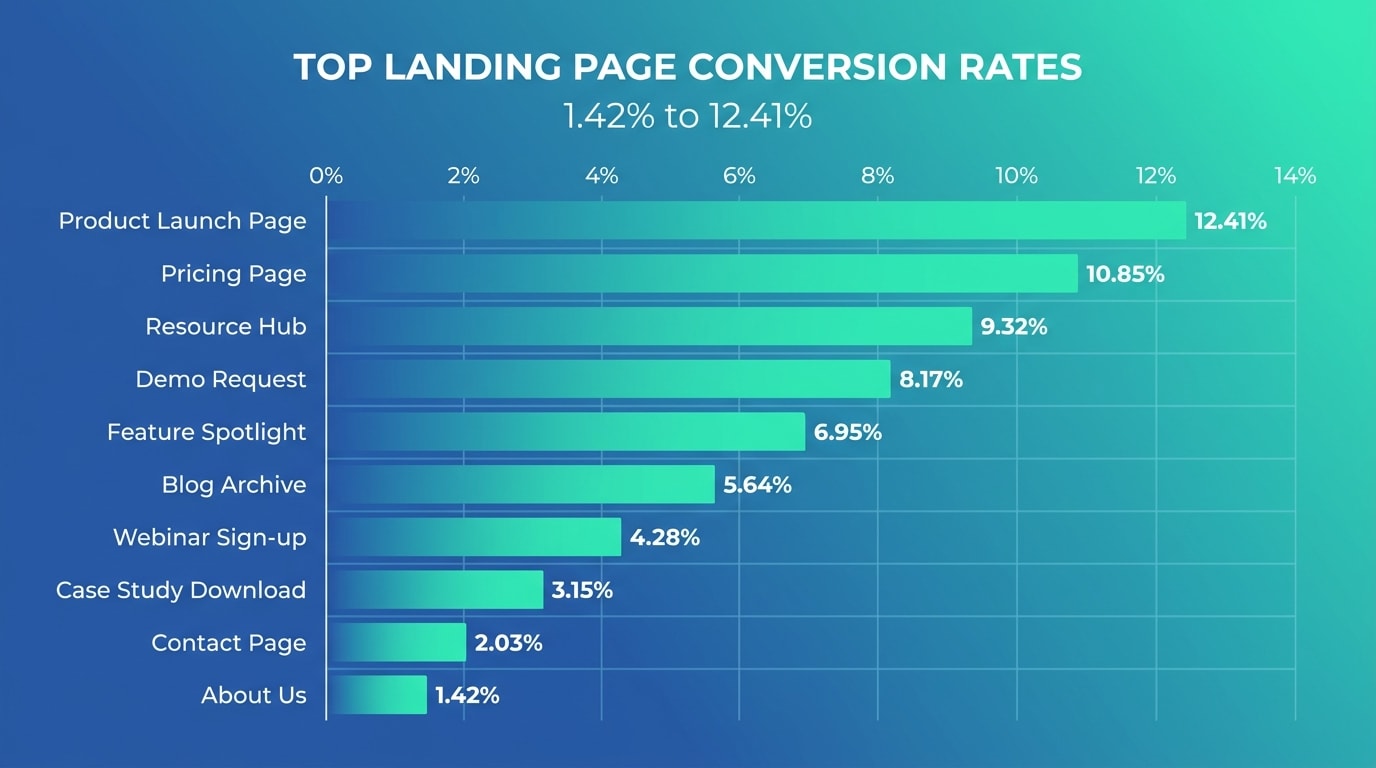
For this local-government software company, we raised top landing page conversion rates from 1.42% to 12.41% with over 500 lead submissions.
This outcome was achieved on a retainer averaging $4,000 per month through HubSpot CMS migration and A/B testing of high-impact landing pages.
Clients in our retainer track maintain the same dedicated team that built their system.
This prevents the knowledge drain that usually happens when a consulting firm hands a project back to an internal team.
The Trap of the Minimum Viable Setup
In our implementations with industrial distributors and regional software firms, we consistently see the fallout of cheap CRM configurations.
A standard setup activates basic software features.
It turns on the lights but fails to wire the house for high-voltage reporting.
When you map a RevOps for spreadsheet to CRM migration, you are essentially translating an offline business logic into a live database.
If your offline logic relies on BDRs sending chat messages to confirm qualified meetings, the CRM will fail to capture that transition.
You have to build properties that force the behavior into the light.
If the CRM does not mandate a scheduled discovery call before a deal reaches the Qualified Stage, your forecast will be wildly inaccurate.
Revenue operations is not about giving people software.
It is about restricting how people can use the software so the resulting data is valid.
Identifying Friction Points Before You Migrate
The biggest risk during a RevOps for spreadsheet to CRM migration is transferring bad data.
Spreadsheets hide data formatting errors.
A column for an industry property might contain several different abbreviations for the exact same sector.
When you import that without standardizing it, your routing rules will break immediately.
Marketing automation workflows will skip contacts who entered with the wrong abbreviation.
So what went wrong?
Usually, the team rushed the data cleansing phase to hit a go-live date.
They prioritized speed over data hygiene.
You must build strict drop-down properties in the CRM first, then map the messy spreadsheet data into those controlled categories.
The Financial Impact of Getting Attribution Right
Without clear attribution, marketing budgets are viewed as discretionary expenses.
When you can prove that a specific webinar series generated three closed-won deals in Q3, marketing becomes a revenue center.
This is what executives actually care about.
To achieve this, the CRM migration must treat every marketing touchpoint as a tracked asset.
Forms cannot just collect names.
They must capture the original source and the specific campaign that drove the visit.
This requires deep technical alignment between your CMS, your marketing automation platform, and your sales pipeline.
If those three systems do not communicate without error, the attribution chain breaks.
The migration project must test these specific handoffs before rolling the system out to the wider team.
Governing the Data Post-Launch
Once the RevOps for spreadsheet to CRM migration is complete, the rules must be enforced permanently.
If a sales manager allows their team to skip the mandated properties during a busy end-of-month push, the system starts decaying.
Governance is not a one-time event.
We implement validation rules that physically prevent a deal from closing if the required data is missing.
This causes friction in the short term.
Reps will complain that the system is slowing them down.
The bottom line?
That friction is the exact mechanism that protects your revenue reporting.
You are trading temporary operational comfort for permanent strategic clarity.
Open your current spreadsheet or legacy CRM right now.
Look at your lost deals from the last quarter and check if you can definitively trace them back to their first marketing touchpoint.
If you cannot draw a straight line from acquisition to a closed-lost or closed-won status, that is your first fix.
No Comments Yet
Let us know what you think